Value your time? Get a high-level overview:
 Ask ChatGPT
 Ask Grok
 Ask Perplexity
 Ask Claude
 Ask Google AI
⚡
- Indexing is the gatekeeper: a page must be crawled and added to Google’s index before it can appear in search results at all — no indexing means no visibility, regardless of how well the site is designed.
- Verify status before making changes: the site: search operator is only a rough orientation check, while the Page Indexing report in Google Search Console is the source for whether a URL is indexed and why.
- Technical blockers are common and fixable: noindex tags, restrictive robots.txt rules, and password-protected pages are the most frequent reasons a page never reaches the index, alongside thin or duplicate content that gives Google no reason to prioritize it.
- How do you get Google to discover important URLs? Submitting a sitemap and requesting indexing can help discovery, but neither guarantees crawling, indexing, or ranking. Use URL Inspection to diagnose a specific page. When the barrier turns out to be technical rather than obvious, our technical SEO specialists can run a full indexing audit and clear it for you.

Imagine Google as a massive digital library containing billions of web pages. When you launch a new website, it’s like publishing a brand-new book. However, for potential customers to find your work on the library shelves, the librarian—Google—must first know it exists, read its content, and add it to the official catalog. In the world of search engines, this essential process is known as indexing.
It starts with crawling, where Google sends out automated robots to discover new pages by following links. If Google finds your site valuable, it saves it in a massive database called the Index. Only after this step can your site appear in search results when people look for your services.
For a business owner, this is critical: if your website isn’t indexed, you are invisible to searchers. You could spend a fortune on a beautiful design, but without indexing, customers simply won’t find you. While Google is good at automatically finding sites, technical barriers can sometimes block its path, making it vital to ensure your site is properly set up.
The Quick Check
Before making any technical changes, you need to know if Google has already found your website. Sometimes, your site might be indexed without you even realizing it. Here are two fast and easy ways to check your status:
- The site: Search Operator. Go to Google and type
site:yourwebsite.cominto the search bar. This is a special command that tells Google to show every page it has in its index for your domain. If you see a list of your pages, you’re in. If the result says “Your search did not match any documents,” it means Google hasn’t indexed your site yet. - Google Search Console (GSC). If you have already set up Google Search Console, check the Page Indexing report. This tool gives you the most accurate data directly from Google. It will show you exactly how many pages are indexed and, more importantly, highlight any pages that Google found but decided not to index.

If your site is brand new, don’t panic if it doesn’t show up immediately. It can take anywhere from a few days to a few weeks for Google to discover and catalog a new website.
Seeing no results for your website can be frustrating, but it’s often just a sign that Google hasn’t been invited properly. In my experience, most indexing issues are not about Google being difficult, but about simple misconfigurations that we can fix in minutes. Checking your status is the first step toward reclaiming your digital presence.
— Andrew Antokhin, founder of Inverox Digital
Step 1. Claim Your Spot (Google Search Console)
Think of Google Search Console as a direct hotline between you and Google. It is a free tool that lets you monitor how your website is performing and, more importantly, see exactly how Google sees your pages. Without it, you are essentially flying blind.
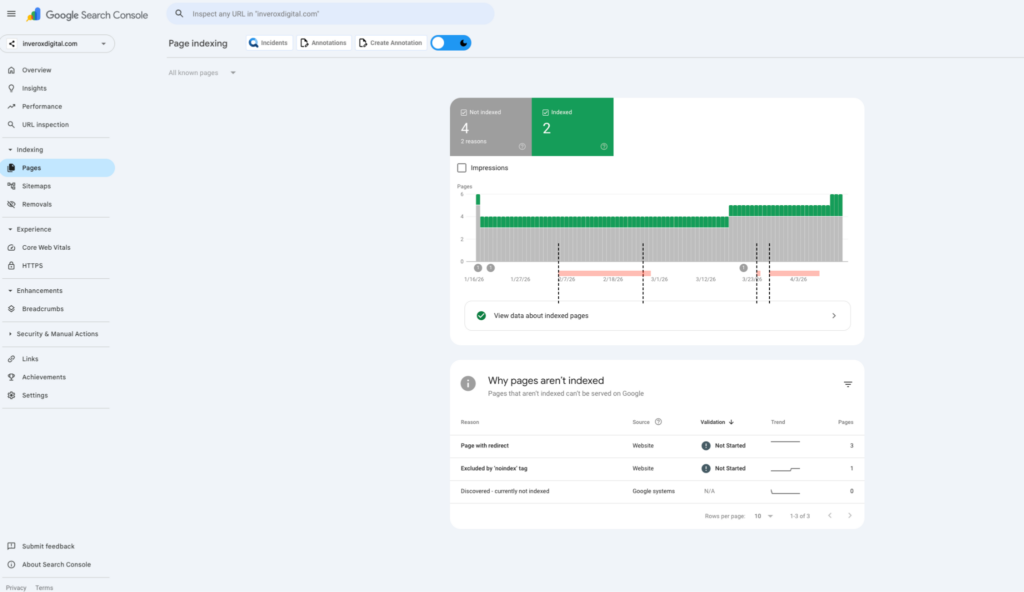
Your quick setup checklist:
- Sign in. Go to the Google Search Console website and log in with your Google account.
- Add your property. Enter your website’s URL (e.g., https://yourwebsite.com) to add it as a Property.
- Verify ownership. Google needs to know you actually own the site. You can do this by adding a small piece of code to your website, uploading a file, or through your domain provider. If you use a platform like Wix or WordPress, they often have a simple one-click verification.
- Check the dashboard. Once verified, wait a day or two for data to populate. You will then be able to see if any of your pages are failing to index and why.
Setting this up is an important step. It helps Google discover your site. It does not guarantee crawling, indexing, or ranking.
Step 2. Sitemaps
If your website is the building, a sitemap is a list of URLs you consider important. Submitting a sitemap helps Google discover those URLs, but it does not guarantee crawling, indexing, or ranking. Use Search Console’s URL Inspection and Page Indexing reports to diagnose a specific URL before changing technical settings.n
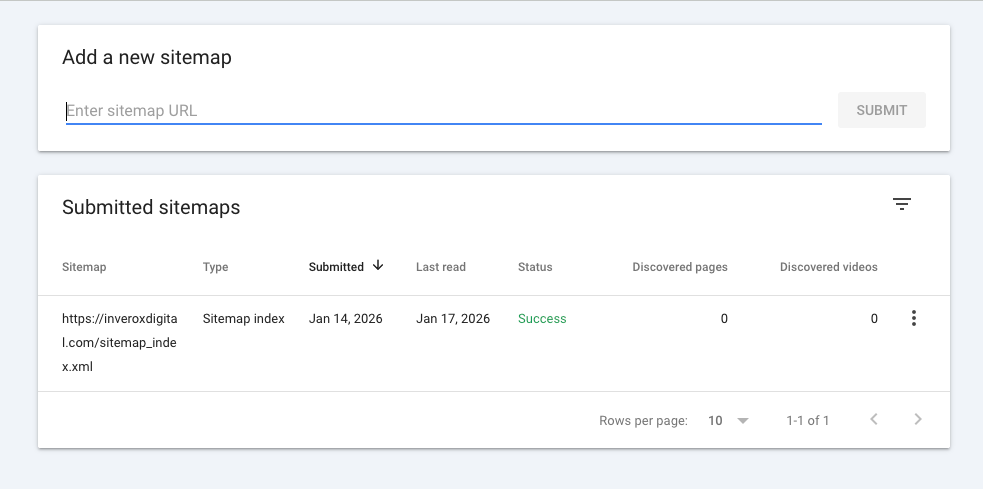
Why a sitemap is a must-have:
- Faster discovery. It tells Google exactly where to find your new content instead of waiting for a robot to stumble upon it.
- No page left behind. It ensures that pages deep in your site structure or those with few internal links are still found and indexed.
- Automatic updates. Most modern website builders (like Wix or WordPress) update your sitemap automatically whenever you add a new blog post or product.
Once you have your sitemap URL (usually yourwebsite.com/sitemap.xml), you should submit it directly to Google Search Console under the Sitemaps section. This is like handing the librarian a direct list of all your books so they can catalog them immediately.
Common Stop Signs
Sometimes, you might unknowingly be telling Google to stay away from your site. Even a single line of hidden code can act like a Keep Out sign for search engines. Below are the most common technical barriers you should check:
| Potential Block | What Is It? | How to Check? |
| Noindex Tag | A piece of code that explicitly tells Google not to include a page in its search results. | Look at your page settings in your website builder (like Wix or WordPress). Ensure “Allow search engines to index this page” is turned on. |
| Robots.txt File | A text file that gives instructions to search robots about which parts of your site they can or cannot visit. | Type yourwebsite.com/robots.txt in your browser. If you see Disallow: /, you are blocking Google from your entire site. |
| Password Protection | If a page is behind a login or a password, Google’s robots cannot see the content to index it. | Check if your “Coming Soon” or private pages are actually ready for the public. |
If you find any of these stop signs, removing them is often the quickest way to get your website to appear on Google.
A single incorrect line in your robots.txt or an accidental noindex tag can cost you months of organic traffic and potential sales. These hidden Keep Out signs are surprisingly common, especially after a site redesign or a platform migration. I always recommend a professional technical audit to ensure no hidden barriers are quietly killing your search visibility.
— Victoria Golubkova, SEO Specialist
Why Google Might Ignore You
Sometimes, your website is technically open for Google, but the search engine chooses not to index certain pages. This usually happens because Google wants to ensure that only the most helpful and unique content reaches its users. If a page is too similar to another one or lacks substance, it might be ignored.

Content quality
| Low Quality (Likely Ignored) | High Quality (Index-Ready) |
| Thin Content. Pages with only one or two sentences or just an image. | Valuable Info. Pages that thoroughly answer a customer’s question or explain a service. |
| Duplicate Content. Copy-pasting text from other websites or having multiple identical pages on your own site. | Unique Perspective. Original descriptions, personal expertise, and fresh insights. |
| Orphan Pages. Pages that have no internal links pointing to them from your other pages. | Well-Connected. Pages that are easily reachable through your website’s navigation menu or blog links. |
The power of links
Google uses links like digital votes of confidence. If other reputable websites link to you, Google views your site as more important and indexes it faster. Similarly, make sure your most important pages are linked from your homepage so the Google spider can find them easily.
Google’s index is not a right; it’s a reward for providing a high-quality user experience. Even if your site is technically perfect, thin or duplicate content will cause Google to prioritize your competitors instead. We focus on building a strong internal linking structure and unique value that makes it impossible for Google to ignore your pages.
— Max Lukianov, SEO Specialist
Speeding Up the Process
While Google’s robots will eventually find your site on their own, you don’t have to sit and wait. If you have just launched a new page or updated an important service, you can take control and invite Google to visit immediately.

Ways to help Google discover important URLs:
- Manual Request. Use the URL Inspection tool in Google Search Console. Simply paste your page’s link into the search bar and click Request Indexing. This puts your page in a priority queue for the librarian to check.
- Share on Social Media. Google discovers new content by following links. Sharing your new website or blog post on platforms like Facebook, LinkedIn, or X (Twitter) creates a digital trail that leads search engines straight to you.
- Fix Broken Links. Ensure there are no dead ends on your site. If a page is linked but leads to an error, it wastes the robot’s time and slows down the indexing of your good pages.
By being proactive, you can reduce the time it takes for your business to appear in search results from weeks to just a few days or even hours.
Conclusion
Getting your website indexed is not a one-time task, but the foundation of your online presence. Google is constantly evolving, and your website should too. By following the steps in this guide—from setting up Google Search Console to creating high-quality, link-worthy content—you ensure your business stays visible to those who need your services most.
Your monthly indexing checklist:
- Monitor Search Console. Briefly check for any new Page Indexing errors.
- Update content. Keep your information fresh so Google has a reason to visit your site often.
- Check your links. Ensure your internal links are working and your sitemap is up to date.
Remember, indexing is just the first step. Once Google sees you, the next goal is to climb higher in the search results. If you find the technical side of SEO overwhelming or want to focus on running your business, we are here to help.
