Value your time? Get a high-level overview:
 Ask ChatGPT
 Ask Grok
 Ask Perplexity
 Ask Claude
 Ask Google AI
- Start with first-party data. Google Search Console shows how your pages appear in Google Search; GA4 shows what visitors do after they arrive. Add other tools only when they answer a specific question—technical issues, backlinks, keyword research, or dashboarding.
- Free plans and product limits change frequently. Check the provider’s current pricing and documentation before building a reporting process around a tool. Checked: October 2026.
- For AI-search reporting, define what you will measure before buying a platform: prompts, market, country, device, answer engine, mention quality, citations, and conversion impact. A brand mention alone is not qualified demand.
If you do not measure outcomes, you cannot tell whether the work changed qualified demand.
I’ve seen far too many business owners and DIY marketers pour hours into creating content and optimizing pages, only to have no idea if their efforts actually moved the needle. They treat SEO like a black box—you put effort in and hope magic comes out. But hope isn’t a strategy.
SEO reporting is the bridge between activity and results. It’s about more than vanity metrics; it’s about understanding how users find you and, more importantly, how search engines perceive your site’s health.
The good news? You don’t need a thousand-dollar monthly subscription to get enterprise-level insights. We are currently in a golden age of free tools. From Google’s own powerhouse platforms to specialized crawlers and AI-monitoring dashboards, you can build a professional-grade reporting stack without spending a dime.
In this guide, we break down the exact tools we use to track success, monitor technical health, and stay ahead of the curve in 2026. Whether you’re a small business owner or a fellow SEO enthusiast, these tools will give you the clarity you need to stop guessing and start growing.
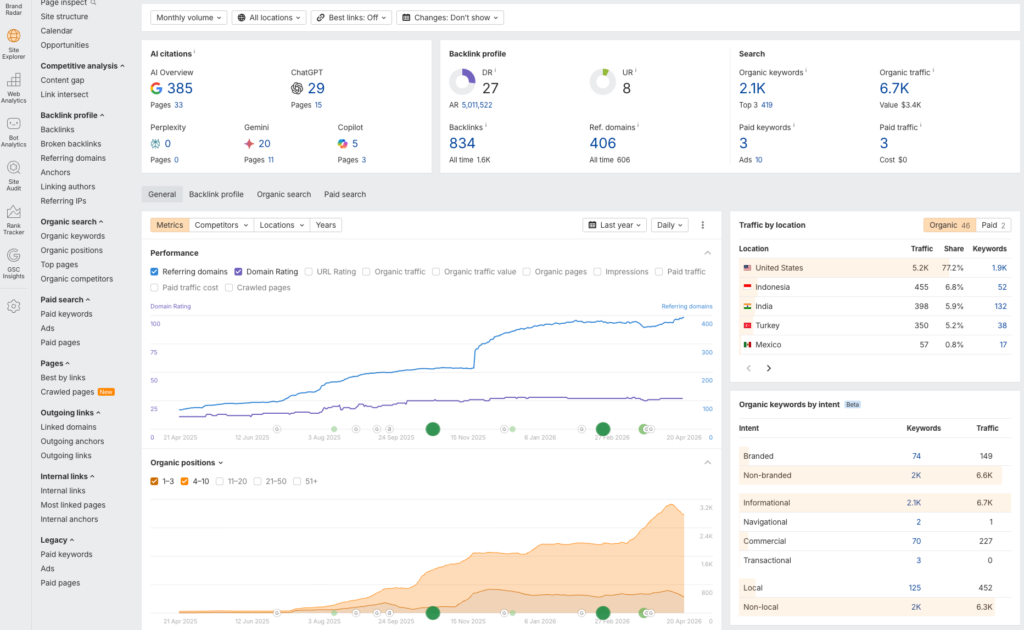
Core Metrics to Track for SEO Success
Before we dive into the how, we need to talk about the what. Most people fail at SEO reporting because they try to track everything. They get lost in a sea of data and miss the signals that actually matter.
If you want to move the needle, focus on metrics that reflect your site’s visibility, health, and impact. Here are the core pillars to monitor for every project:
- Organic Traffic & Conversions. The ultimate goal. Are real people finding your site through search engines, and are they doing what you want them to do (signing up, buying, or making contact)?
- Keyword Rankings. Tracking your share of voice. You need to know where you stand for your primary head terms and, more importantly, your long-tail money keywords.
- Indexing & Crawlability. If Google can’t find or read your pages, they don’t exist. Monitoring Coverage issues is non-negotiable.
- Backlink Profile Health. Tracking new and lost backlinks helps you understand your site’s growing authority and protects you from potential spam attacks.
- Technical Health (Core Web Vitals). Core Web Vitals are useful signals of real-user page experience, but they do not guarantee rankings.
- AI Search Visibility. With the rise of AI Overviews and other AI-powered search experiences, tracking how often your brand appears in AI overviews is the new frontier for 2026.
Top Free SEO Reporting Tools from Google
When it comes to SEO reporting, Google’s own tools are the gold standard. Why? Because they provide data straight from the source. If you aren’t using these two powerhouses, you’re essentially flying blind.
Google Search Console (GSC)

This is, hands down, the most important tool in your arsenal. While other tools estimate your traffic, GSC tells you exactly how many people clicked on your site from search results and what keywords they used to get there.
- Performance Reports. Track total clicks, impressions, and your average position over time.
- Indexing Issues. It alerts you if Google is having trouble reading your pages (the Page Indexing report).
- Core Web Vitals. Provides real-world data on how fast and stable your pages are for actual users.
Google Analytics 4 (GA4)
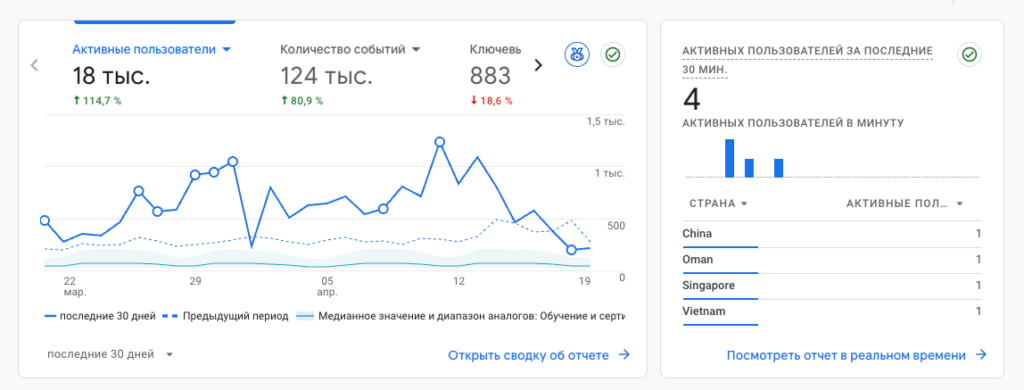
While GSC tells you what happens on the search results page, GA4 tells you what happens after visitors land on your site. For SEO reporting, it’s vital for tracking the quality of your organic traffic.
- Engagement Rate. Are people actually reading your content, or are they leaving immediately?
- Conversions. You can see exactly which organic landing pages are driving sales or lead sign-ups.
Don’t just look at Total Clicks. Dig into the Search Console Queries report and filter by Position. Look for keywords in positions 4–10; these are your low-hanging fruit. A small optimization push here can double your traffic.
— Andrew Antokhin, SEO Specialist
Best Free Tools for Specialized SEO Reports
While Google provides the foundation, specialized tools allow you to perform deep dives into technical health, competitor gaps, and the evolving world of AI search. Here is a breakdown of the best specialized reporting tools for uncovering the details Google doesn’t always show.
| Tool | Core Function | Free Version Limits |
| Ahrefs Webmaster Tools | Backlinks, health, and keywords | Limited to verified sites; includes 5,000 crawl credits |
| Screaming Frog | Technical SEO audit | Crawls up to 500 URLs |
| Keywords Everywhere | On-the-fly keyword data | Free for limited metrics like People Also Ask |
| Bing Webmaster Tools | Site performance and audits | Unlimited for verified sites |
Advanced Competitor & Technical Tracking

- Ahrefs Webmaster Tools (AWT). This is a game-changer for monitoring site health and backlink profiles. You can get reports on every backlink your site has, see which keywords you’re starting to rank for, and run automated technical audits that flag issues like broken links or missing tags.
- Screaming Frog SEO Spider. The industry standard for technical reporting. Use it to crawl sites and generate reports on 404 errors, duplicate content, and missing metadata. The free version is plenty for most small-to-medium websites.
- Bing Webmaster Tools. Don’t ignore Bing. Their free dashboard offers excellent technical reporting and indexing tools that sometimes catch errors Google’s tools miss.
The AI Frontier: Monitoring AI Search
As AI Overviews and other AI-powered search experiences change discovery, define what you will measure before choosing a reporting tool: prompts, market, country, device, answer engine, mention quality, citations, and conversion impact. A brand mention alone is not qualified demand.
Run a Screaming Frog crawl at least once a month. Export the Internal All report and filter for Status Code 404. Fixing these broken links is the fastest technical reporting win you can deliver to a client or your own business.
— Andrew Antokhin, SEO Specialist
Reporting Dashboards with Looker Studio
Data is only useful if you can understand it. If you spend your time manually copying numbers from Google Search Console into a spreadsheet, you’re wasting valuable hours that could be spent on actual optimization.
This is where Google Looker Studio (formerly Data Studio) comes in. It is the glue that holds your SEO reporting together. It allows you to pull data from Google Search Console, GA4, and even BigQuery or CSV exports into a single, automated dashboard.
Why Looker Studio Matters for SEO Reporting
- Real-Time Updates. Once you connect your data sources, the report updates itself. No more manual data entry.
- Customization. You can blend data. Want to see your organic clicks right next to your conversion rate? You can do that in one chart.
- Professionalism. When reporting to a client or a manager, a clean, branded dashboard is far more impressive than a messy spreadsheet.
How to Set It Up: The Quick-Start Way
- Connect Your Source. Choose the Google Search Console connector.
- Pick a Template. Don’t start from scratch. Looker Studio has plenty of free Search Console Report templates.
- Filter for Success. Create a filter to show only Organic traffic so you aren’t distracted by paid or social data.
Create a Comparison view in your charts. Looking at this month’s performance is useful, but looking at a This Month vs. Last Year comparison is how you identify true seasonal trends and long-term growth.
— Andrew Antokhin, SEO Specialist
Automation
If you’re still manually checking rankings or status codes every morning, you’re playing the SEO game on hard mode. In 2026, the real professionals use automation to handle the grunt work of data collection, leaving more time for strategy.
Automated reporting isn’t just about saving time; it’s about consistency. It ensures you catch a sudden drop in rankings or a technical crawl error before it turns into a disaster.
Favorite Automation Workflows
- Make and Zapier. Use these automation platforms to refresh Looker Studio sources, alert on crawl errors, and push weekly reporting summaries to Slack or email without manual exports.
- Scheduled Screaming Frog Crawls. Screaming Frog crawls can be scheduled from the command line. A weekly Sunday-night run means a fresh report of any new broken links or redirected pages by Monday morning.
- Ahrefs Alerts. A simple but effective automation. Setting up alerts for New Backlinks and Keyword Movements means the reporting comes to you, rather than the other way around.
Conclusion
We’ve covered a lot of ground, but the takeaway is simple: you don’t need a massive budget to have professional-grade SEO insights in 2026.
By combining the raw data from Google Search Console and GA4 with the technical depth of Screaming Frog and a clearly defined AI-search measurement plan, you have everything you need to stay competitive. The real advantage comes when you stop treating these as separate tools and start viewing them as a unified system—automated via Make or Zapier and visualized in Looker Studio.
Remember, SEO is a marathon, not a sprint. The best tool in your arsenal isn’t a piece of software—it’s your consistency in checking these reports and turning that data into action.
